Cloud Agents
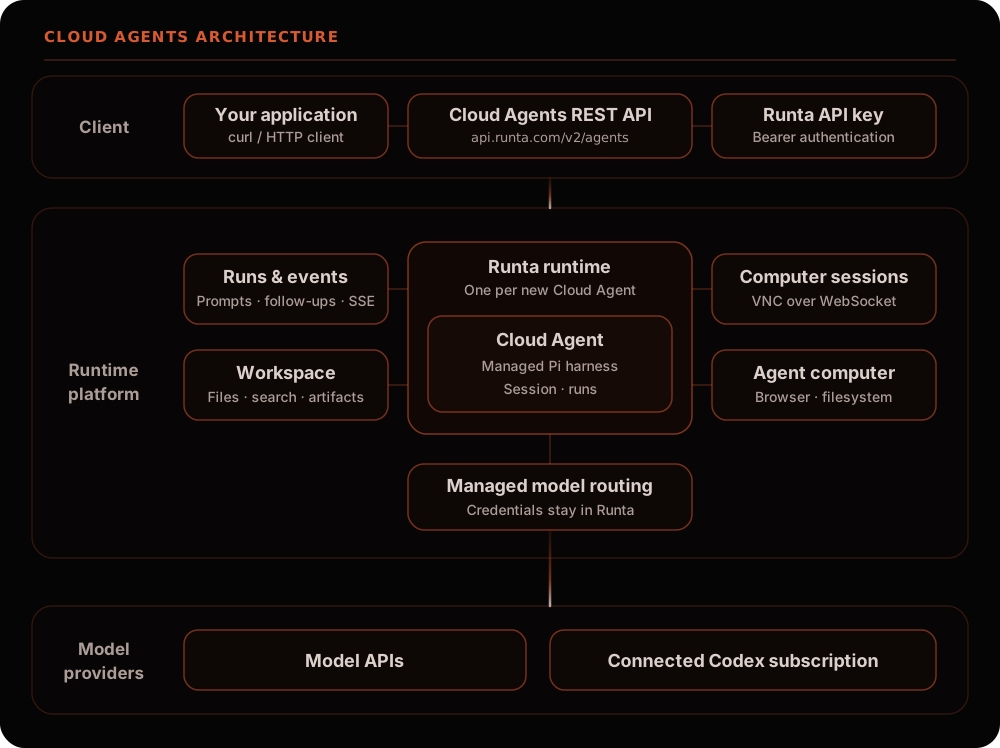
By default, each new Cloud Agent gets its own Runta runtime with one managed Pi agent instance. Send a prompt through the REST API, watch the agent work, and collect its reply or files. The runtime supplies the computer, browser, filesystem, and model routing; the agent instance maintains its conversation.
Start with the quickstart to create an agent and receive its first response.
Concepts
Section titled “Concepts”| Resource | Purpose |
|---|---|
| Runtime | The agent’s cloud computer, providing its files, desktop, compute resources, and model routing. Default creation provisions a new runtime for each agent. |
| Agent / harness | A managed Pi instance with its own configuration and conversation. harness_id is the API’s name for that instance. |
| Run | One submitted task and its execution state, final reply, error, and event log. Only one run can be active per harness. |
| Session | Pi’s conversation, identified by a run’s dsh_session_id. A harness keeps a conversation across runs. |
| Artifact | A named file explicitly registered against a run, with metadata and optional downloadable content. |
| Computer session | Expiring authorization to connect to the runtime’s VNC desktop. |
Creating a fresh agent creates a new runtime and its default harness, as shown
above. Further runs and follow-ups use that agent’s existing runtime.
For explicit runtime reuse, runtime.type: "existing" can add another harness
to an existing Cloud Agent runtime. This optional mode shares the computer and
provider while keeping conversations independent. See
Share an existing computer.
Cloud Agents currently use Pi RPC. The harness.kind field does not select
Codex CLI or Claude Code. A connected Codex subscription supplies model access
to Pi. To install and operate a coding agent directly in a runtime, see
Runtime Basics.
Choose a workflow
Section titled “Choose a workflow”| Goal | Guide |
|---|---|
| Create an agent and read its reply | Quickstart |
| Use an API provider or connected Codex subscription | Model providers |
| Attach repositories, restore a checkpoint, share a computer, rename, or delete | Agent lifecycle |
| Send images, follow up, cancel, stream, or reconnect | Runs and events |
| Read/write files, search the workspace, or publish a run’s output | Workspace and artifacts |
| Connect a browser desktop viewer | Computer sessions |
| Look up every endpoint, schema, and status code | API reference |
Authentication and availability
Section titled “Authentication and availability”Use the public API at https://api.runta.com with
Authorization: Bearer $RUNTA_TOKEN. A Runta API key belongs to one organization;
its permissions govern which providers, repositories, and runtimes it can use.
Create a key in the dashboard under
Settings → Runta API Keys.
The examples use the public REST API and require curl and jq. They describe
the current core implementation. Runtime features also depend on the
cloud_agent image installed in the deployment: an existing runtime does not
automatically gain features from a newer bundle.
Agent creation and run submission are asynchronous. An agent’s status is the
runtime’s lifecycle state; a run’s status describes the task. Receiving an
agent with status: "running" does not mean its initial task has finished.
For compute usage, see Pricing. Deleting a run’s artifact or cancelling a run does not delete its runtime.