
When xAI announced Grok Bot, the pitch was simple: an agent with its own computer that you talk to like a colleague. We wanted an open-source version, so we built Errand. It’s a macOS app. You create an agent, hand it something to do, and come back later to the same conversation and the same machine, with whatever files it left behind still there.
Errand runs on Runta Cloud Agents, which we also build, so this post is partly about Errand and partly about what a desktop app needs from the runtime underneath it. Here’s what stood out.
Two computers, not one
The first thing to get straight is that Errand is really two machines. There’s the Mac you’re typing on, and there’s a computer in the cloud that belongs to the agent. You type in the app; the agent does the work over there, in its own browser and its own shell, saving files to its own disk.
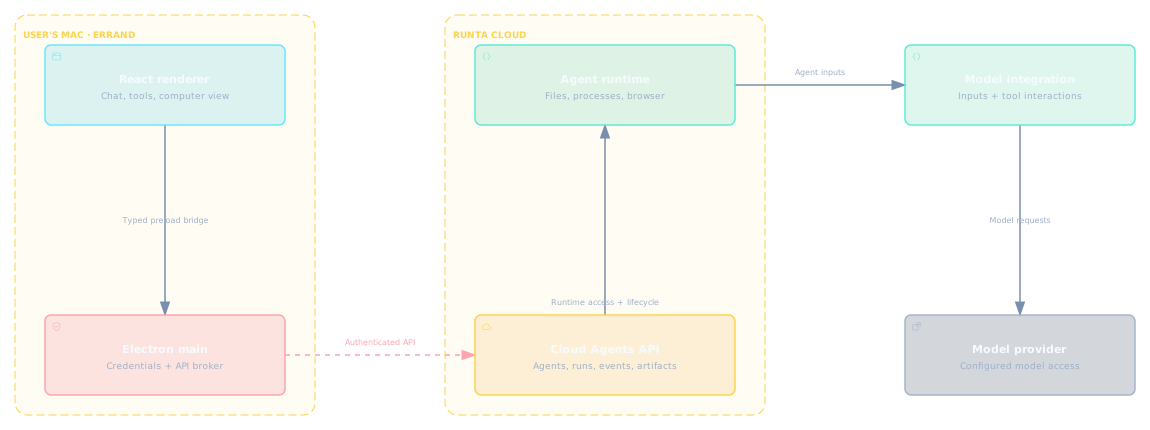
Runta sits between them. The app sends tasks up and pulls messages, progress, and results back down. Runta owns the agent’s machine (we call it a runtime) and the work queued for it. On the far side, a model integration talks to whichever provider the agent is configured to use.
One detail worth knowing if you read the source: sign-in and authenticated requests live in the Electron main process, not in the React renderer. And because the app leans on Runta for the runtime, building from source isn’t fully self-contained. You still need a Runta account and a model provider set up for your agents.
Computer use is mostly browser use
We integrated the cua driver so agents can operate apps the way a person does: look at the screen, click, type, read what comes back.
When we listed the tasks we actually wanted to hand off, almost all of them lived in a browser. Reading up on a topic across a dozen tabs and keeping track of which source said what. Filling in a form and confirming it really submitted. Moving between web apps that don’t talk to each other. So for us, getting computer use right has mostly meant getting browser use right, and that’s where we’ve put the effort.
macOS gives the agent more than pixels
The best computer-use experience we’ve had so far is Codex desktop with Astra on macOS. We think a good part of that comes down to Apple’s accessibility work.
For years, macOS apps have been able to describe themselves to assistive technology: this element is a button, its label is “Save,” it can be pressed. That was built for screen readers. It turns out to be exactly what an agent wants too. Instead of guessing from a screenshot that a grey rectangle is probably a button, the agent can ask. It still sees the screen, but it also gets a structured account of what’s on it and what each thing does.
Nobody designed those APIs with agents in mind. But in our experience so far, the platform with the longest accessibility history is also the one where agents do best.
What happens when you close the app
This is the question that shaped most of Errand’s design. You give an agent a job, then you quit the app. Now what?
It’s tempting to make the chat window be the agent: close it and the work stops, or it keeps going and you have no way to find out how it went. We wanted closing the app to mean exactly one thing: you stopped watching. So Errand treats three things as having separate lifetimes.
- Your connection to the agent. This is the fragile one. It ends when you quit, close the laptop, or lose Wi-Fi.
- The task the agent is working on. It runs in the cloud and doesn’t care whether anyone is watching.
- The agent’s computer, the runtime. It outlives the task, so the document the agent downloaded or the repo it edited is still there next time.
Once you separate those, a lot of decisions make themselves. A dropped connection tells you nothing about whether the task succeeded, so Errand doesn’t infer task state from the connection. It asks the backend, which is the only party that actually knows. When you reopen the app, it fetches the saved status and results and picks up where you left off.
The same goes for the live view. While a task runs, Errand shows the agent’s tool calls and a live picture of its desktop, so you can see whether it’s mid-command or stuck at a login page. That picture can drop on its own. When it does, the app has to report it as what it is, you lost the view, rather than let it look like the agent failed.
If you want to see how the pieces fit, the Errand source is on GitHub and the Runta docs cover the runtime side. The short version of what we learned: the chat window is the least important part of a persistent agent. Design for the moment it’s closed.