
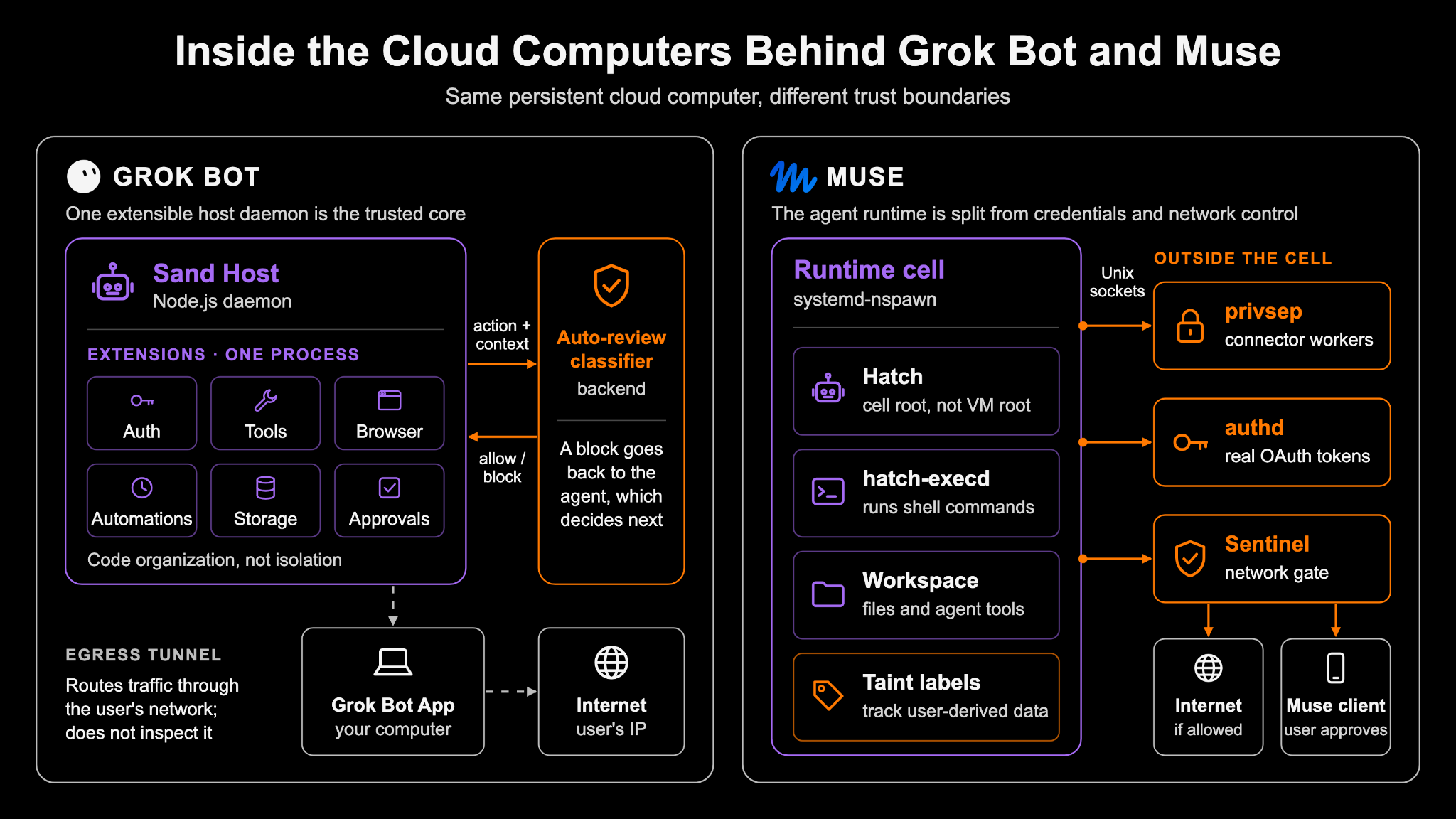
Muse and Grok Bot have both been getting a lot of attention lately. Both give an agent its own cloud computer, where it can run commands, browse the web, and work with your files.
Say the agent reads an email with a malicious instruction to upload one of your private files, and follows it. We were curious about what would happen next.
- Does anything check the upload before it leaves the computer?
- Can the agent get around that check?
We looked at the daemons inside their cloud computers to see how each system handles this case.
| Grok Bot: Auto-review | Muse: Sentinel | |
|---|---|---|
| What gets reviewed? | Command Relevant Context | Command Relevant context Process Taint State Outbound Request (even after approval) |
| Where does the review happen? | Outside of the computer | In the different systemd container |
| External Service Credentials Handling | Agents call the Grok backend integration service without touching real credentials. | Agents use placeholders; real credentials are injected at egress. |
| Network | Destination Check Optionally route traffic to user’s computer | Destination Check Request-level inspection and authorization |
For this kind of attack, we prefer having a check at the network/egress boundary. Reviewing the command can catch the problem early, but a script may decide what to upload and where to send it only after it starts running. A separate service like Sentinel gets to check the request at that point, and Agents cannot turn it off.
That extra check can still get the decision wrong. What we like about the design is that the agent following a malicious instruction does not automatically give it permission to send the data out.
Grok Bot: Sand Host And Auto Review
Grok Bot’s cloud computer runs a Node.js daemon called Sand Host. It coordinates conversations, tools, browser control, automations, and approvals. These capabilities are loaded as extensions in the same process.
In our prompt injection example, the agent proposes a command to read the private file and upload it. Sand Host sends that proposed action and the relevant conversation context to a backend classifier.
If the classifier returns allow, the action proceeds. If it returns block, the result goes back to the agent. The agent can stop or ask the user for approval by evaluating the user’s consent, with Sand Host handling the approval dialog.
The classifier gets a chance to catch the upload before the command runs. How much it can see depends on the command. A curl command might show the file and destination directly. A command that launches a script may reveal less, because the script can choose what to send and where to send it while running.
Muse: Runtime Cell and Sentinel
Muse’s agent daemon, Hatch, runs inside a runtime cell alongside its tools and workspace. Sentinel, authd, and privsep workers run outside that cell, on the same VM. Code inside the cell cannot simply modify or disable these services.
In our prompt injection example, Hatch uses hatch-execd to start the command inside the cell. The command reads the private file and attempts to upload it. If Muse tracks that file as user data, its kernel-level tracking marks the process as tainted. That label affects the approval policy applied to its outbound requests.
The upload then reaches Sentinel. For HTTP, Sentinel can inspect the destination, method, path, and decoded request. It allows the request, blocks it, or asks the user directly through the Muse client. Even though the command is already running, the upload still needs authorization before leaving the VM.
Built-in connectors follow a separate path. The tool inside the cell sends its arguments over a Unix socket to a privsep worker outside the cell. The worker executes the connector logic with access limited to its assigned credentials. Authd stores the real credentials and issues placeholders. After Sentinel authorizes the outbound request, it replaces those placeholders with the real credentials at egress.
This keeps the agent from getting the real token. It does not stop the agent from misusing data it is allowed to read, which is why request checks and action-level permissions still matter.
Building These Boundaries with Runta
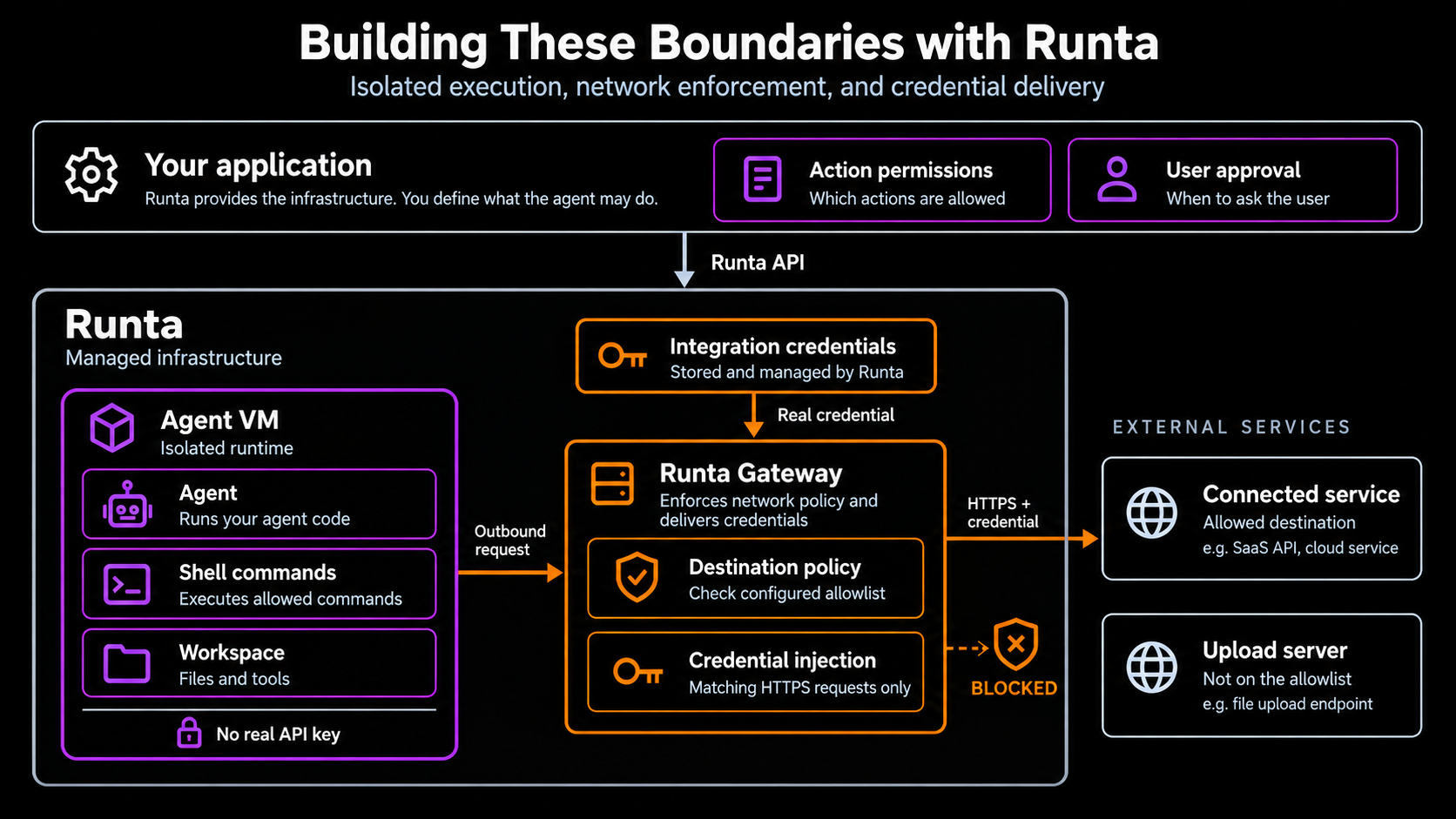
Putting these controls outside the agent takes work. You need somewhere isolated to run its code, network controls enforced outside the agent’s environment, and a way to let it use connected services without handing it their credentials. Those pieces also need to keep working as agents start, stop, and reconnect.
Runta provides that infrastructure. Agents run in isolated VMs, with network policies enforced outside the Agent computer. You just need to configure which destinations a runtime can reach.
Runta also handles credentials for configured integrations. The agent sends its request without the real credentials, and the gateway adds the credential to matching outbound HTTPS requests. The agent can use the service without holding its API key.
Take the same malicious email with prompt injection. If the upload server is not on the runtime’s destination allowlist, Runta blocks the connection even if the agent runs the command. And if the agent is using a service through credential injection, there is no real token in its environment for that command to steal.
Your application still needs rules for what the agent may do with permitted access, such as which recipient can receive an email or when to ask the user. Runta gives you a foundation for those rules: isolation, network enforcement, and credential delivery are already in place. You can build the permissions your product needs without first building and operating those systems yourself.